 DayPilot
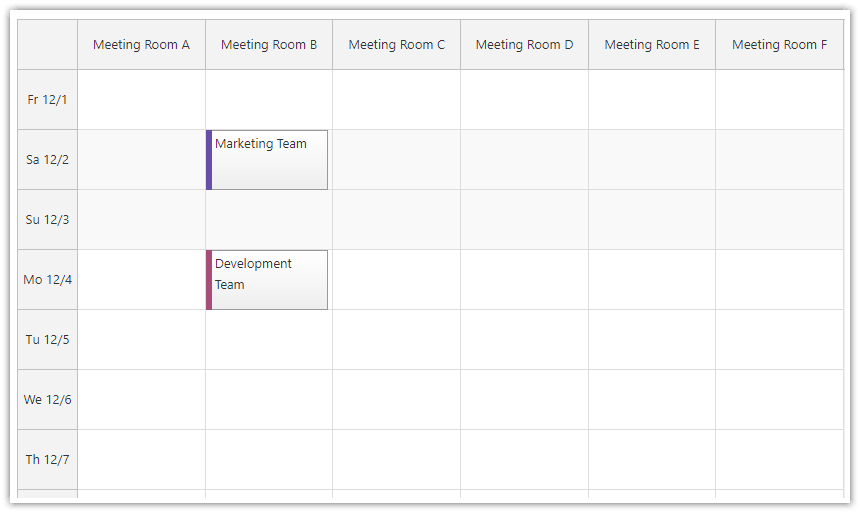
The scale property lets you select one of the predefined scale units or define a custom scale unit in minutes. The scale unit will be used to generate the timeline on the vertical axis of the JavaScript Calendar.
Supported values:
"Minute""Hour""Day""Week""CellDuration""Manual": use explicit timeline cells in JavaScript Pro.
The default value ("CellDuration") lets you specify the cell duration in minutes.
The larger scale units, such as days and weeks, are useful in the resource calendar view, where resources are displayed on the horizontal axis. This view allows you to display a timeline for multiple resources side-by-side.
Manual and Hidden Intervals
For varying cell durations, independent heights or gaps, use a manual timeline. For generated hour/day cells that omit nights or weekends, use non-business-time filtering. onIncludeTimeCell can customize individual generated cells.
JavaScript
const calendar = new DayPilot.Calendar("dp", {
  startDate: "2028-04-03",
  viewType: "Resources",
  days: 7,
  columns: [{id: "A", name: "Cedar room"}],
  scale: "Day"
});
calendar.init();
Angular
Add the configuration to an existing Calendar component.
<daypilot-calendar [config]="config"></daypilot-calendar>import {DayPilot} from "daypilot-pro-angular";
config: DayPilot.CalendarConfig = {
startDate: "2028-04-03",
viewType: "Resources",
days: 7,
columns: [{id: "A", name: "Cedar room"}],
scale: "Day"
};React
import {DayPilot, DayPilotCalendar} from "daypilot-pro-react";

<DayPilotCalendar
  startDate="2028-04-03"
  viewType="Resources"
  days={7}
  columns={[{id: "A", name: "Cedar room"}]}
  scale="Day"
/>
Vue
<script setup lang="ts">
import {DayPilot, DayPilotCalendar} from "daypilot-pro-vue";
const columns: NonNullable<DayPilot.CalendarConfig["columns"]> = [{id: "A", name: "Cedar room"}];
</script>

<template>
  <DayPilotCalendar
    startDate="2028-04-03"
    viewType="Resources"
    :days="7"
    :columns="columns"
    scale="Day"
  />
</template>
Live Demos
Availability
Availability of this feature in DayPilot editions:
| Product | Lite | Pro |
|---|---|---|
| DayPilot for JavaScript | ||
| DayPilot for ASP.NET WebForms | ||
| DayPilot for ASP.NET MVC | ||
| DayPilot for Java |