 DayPilot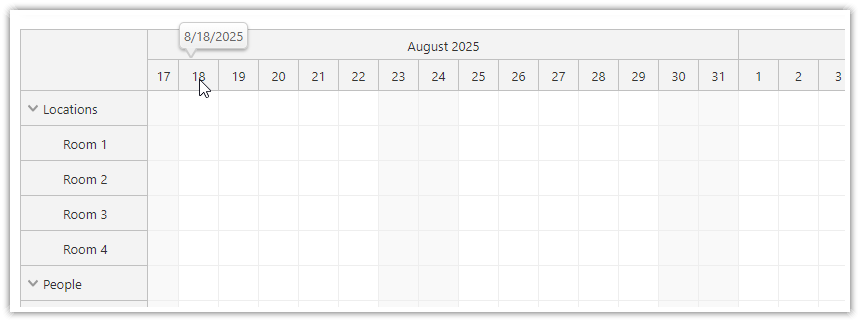
The JavaScript Scheduler component can display a callout with additional information when hovering the time header.
This feature is available since version 2025.3.6583.
You can define the bubble using the timeHeaderBubble property.
{
    timeHeaderBubble: new DayPilot.Bubble(),
    // ...
}
The bubble HTML can be defined statically using the onBeforeTimeHeaderRender event handler:
onBeforeTimeHeaderRender: args => {
    args.header.bubbleHtml = args.header.start.toString("M/d/yyyy");
},
You can also define it dynamically right before the bubble shows up, using the onLoad event handler of the DayPilot.Bubble object:
{
    timeHeaderBubble: new DayPilot.Bubble({
        onLoad: (args) => {
            const p = args.source;
            const date = p.start.toString("M/d/yyyy");
            args.html = `<div>${date}</div>`;
        }
    }),
    // ...
}
Demo
API: timeHeaderBubble.
The examples generate hover content from the time header's start and end dates. The displayed range explicitly labels the end as exclusive.
The framework examples use DayPilot Pro. For installation, see the Angular, React or Vue Scheduler guide.
Angular
import {Component} from "@angular/core";
import {DayPilot, DayPilotModule} from "daypilot-pro-angular";

@Component({
  selector: "app-scheduler-example",
  standalone: true,
  imports: [DayPilotModule],
  template: `

    <daypilot-scheduler [config]="config"></daypilot-scheduler>
  `
})
export class SchedulerExampleComponent {
  config: DayPilot.SchedulerConfig = {
    startDate: "2026-11-01",
    days: 30,
    scale: "Day",
    timeHeaders: [{groupBy: "Month"}, {groupBy: "Day", format: "d"}],
    resources: [{id: "A", name: "Room A"}, {id: "B", name: "Room B"}],
    events: [{id: 1, text: "Planning", resource: "A", start: "2026-11-03", end: "2026-11-06"}, {id: 2, text: "Delivery", resource: "B", start: "2026-11-08", end: "2026-11-11"}],
    timeHeaderBubble: new DayPilot.Bubble({onLoad: args => { args.html = args.source.start.toString("d MMM yyyy") + " – " + args.source.end.toString("d MMM yyyy") + " (exclusive end)"; }})
  };

}
React
import React from "react";
import {DayPilot, DayPilotScheduler} from "daypilot-pro-react";

export default function SchedulerExample() {

  return <div>

    <DayPilotScheduler
      startDate={"2026-11-01"}
      days={30}
      scale={"Day"}
      timeHeaders={[{groupBy: "Month"}, {groupBy: "Day", format: "d"}]}
      resources={[{id: "A", name: "Room A"}, {id: "B", name: "Room B"}]}
      events={[{id: 1, text: "Planning", resource: "A", start: "2026-11-03", end: "2026-11-06"}, {id: 2, text: "Delivery", resource: "B", start: "2026-11-08", end: "2026-11-11"}]}
      timeHeaderBubble={new DayPilot.Bubble({onLoad: args => { args.html = args.source.start.toString("d MMM yyyy") + " – " + args.source.end.toString("d MMM yyyy") + " (exclusive end)"; }})}
    />
  </div>;
}
Vue
<script setup>
import {DayPilot, DayPilotScheduler} from "daypilot-pro-vue";

const startDate = "2026-11-01";
const days = 30;
const scale = "Day";
const timeHeaders = [{groupBy: "Month"}, {groupBy: "Day", format: "d"}];
const resources = [{id: "A", name: "Room A"}, {id: "B", name: "Room B"}];
const events = [{id: 1, text: "Planning", resource: "A", start: "2026-11-03", end: "2026-11-06"}, {id: 2, text: "Delivery", resource: "B", start: "2026-11-08", end: "2026-11-11"}];
const timeHeaderBubble = new DayPilot.Bubble({onLoad: args => { args.html = args.source.start.toString("d MMM yyyy") + " – " + args.source.end.toString("d MMM yyyy") + " (exclusive end)"; }});

</script>

<template>
  <div>

    <DayPilotScheduler
      :startDate="startDate"
      :days="days"
      :scale="scale"
      :timeHeaders="timeHeaders"
      :resources="resources"
      :events="events"
      :timeHeaderBubble="timeHeaderBubble"
    />
  </div>
</template>
Availability
Availability of this feature in DayPilot editions:
| Product | Lite | Pro |
|---|---|---|
| DayPilot for JavaScript | ||
| DayPilot for ASP.NET WebForms | ||
| DayPilot for ASP.NET MVC | ||
| DayPilot for Java |