 DayPilot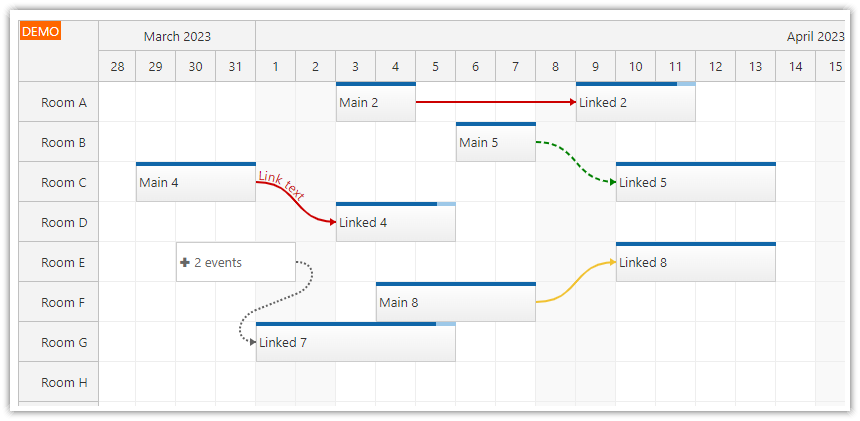
Links, which show dependencies between two JavaScript Scheduler events, can display text that follows the link path.
Text is supported for
"Curved"and"RightAngled"links (see link shapes for more details).The link type must be
"FinishToStart".The text will use the same color as the link.
Set
textAlignmentto"start","center", or"end". The default is"start".
Link text is available since version 2023.4.5820. The textAlignment property is available since version 2024.1.5898. Text for "RightAngled" links is supported in 2026.3.7040 (introduced in build 7025).
Example
You can specify the link text using the text property:
const links = [
  {
    id: 101,
    from: "main-4",
    to: "linked-4",
    type: "FinishToStart",
    text: "Link text",
    textAlignment: "center"
  }
];
API: linkShape, links.list.
The framework examples center the label Approval on a right-angled dependency.
The framework examples use DayPilot Pro. For installation, see the Angular, React or Vue Scheduler guide.
Angular
Configure linkShape at Scheduler level and put text and textAlignment in the link stored in config.links.
import {Component} from "@angular/core";
import {DayPilot, DayPilotModule} from "daypilot-pro-angular";

@Component({
  selector: "app-scheduler-example",
  standalone: true,
  imports: [DayPilotModule],
  template: `

    <daypilot-scheduler [config]="config"></daypilot-scheduler>
  `
})
export class SchedulerExampleComponent {
  config: DayPilot.SchedulerConfig = {
    startDate: "2026-11-01",
    days: 30,
    scale: "Day",
    timeHeaders: [{groupBy: "Month"}, {groupBy: "Day", format: "d"}],
    resources: [{id: "A", name: "Room A"}, {id: "B", name: "Room B"}],
    events: [{id: 1, text: "Planning", resource: "A", start: "2026-11-03", end: "2026-11-06"}, {id: 2, text: "Delivery", resource: "B", start: "2026-11-08", end: "2026-11-11"}],
    linkShape: "RightAngled",
    links: [{id: "L1", from: 1, to: 2, type: "FinishToStart", text: "Approval", textAlignment: "center"}]
  };

}
React
Pass linkShape and links as separate props; the label belongs to the link object inside the array.
import React from "react";
import {DayPilot, DayPilotScheduler} from "daypilot-pro-react";

export default function SchedulerExample() {

  return <div>

    <DayPilotScheduler
      startDate={"2026-11-01"}
      days={30}
      scale={"Day"}
      timeHeaders={[{groupBy: "Month"}, {groupBy: "Day", format: "d"}]}
      resources={[{id: "A", name: "Room A"}, {id: "B", name: "Room B"}]}
      events={[{id: 1, text: "Planning", resource: "A", start: "2026-11-03", end: "2026-11-06"}, {id: 2, text: "Delivery", resource: "B", start: "2026-11-08", end: "2026-11-11"}]}
      linkShape={"RightAngled"}
      links={[{id: "L1", from: 1, to: 2, type: "FinishToStart", text: "Approval", textAlignment: "center"}]}
    />
  </div>;
}
Vue
Bind :linkShape and :links to the script values. Keep the label and alignment fields with the dependency data.
<script setup>
import {DayPilot, DayPilotScheduler} from "daypilot-pro-vue";

const startDate = "2026-11-01";
const days = 30;
const scale = "Day";
const timeHeaders = [{groupBy: "Month"}, {groupBy: "Day", format: "d"}];
const resources = [{id: "A", name: "Room A"}, {id: "B", name: "Room B"}];
const events = [{id: 1, text: "Planning", resource: "A", start: "2026-11-03", end: "2026-11-06"}, {id: 2, text: "Delivery", resource: "B", start: "2026-11-08", end: "2026-11-11"}];
const linkShape = "RightAngled";
const links = [{id: "L1", from: 1, to: 2, type: "FinishToStart", text: "Approval", textAlignment: "center"}];

</script>

<template>
  <div>

    <DayPilotScheduler
      :startDate="startDate"
      :days="days"
      :scale="scale"
      :timeHeaders="timeHeaders"
      :resources="resources"
      :events="events"
      :linkShape="linkShape"
      :links="links"
    />
  </div>
</template>
Availability
Availability of this feature in DayPilot editions:
| Product | Lite | Pro |
|---|---|---|
| DayPilot for JavaScript | ||
| DayPilot for ASP.NET WebForms | ||
| DayPilot for ASP.NET MVC | ||
| DayPilot for Java |