 DayPilot
It is possible to use a special mode where the user can select an exact position inside the target cell when moving the event (relative to other events in the target cell).
You can use this feature to manage priority ordering.
Moving modes
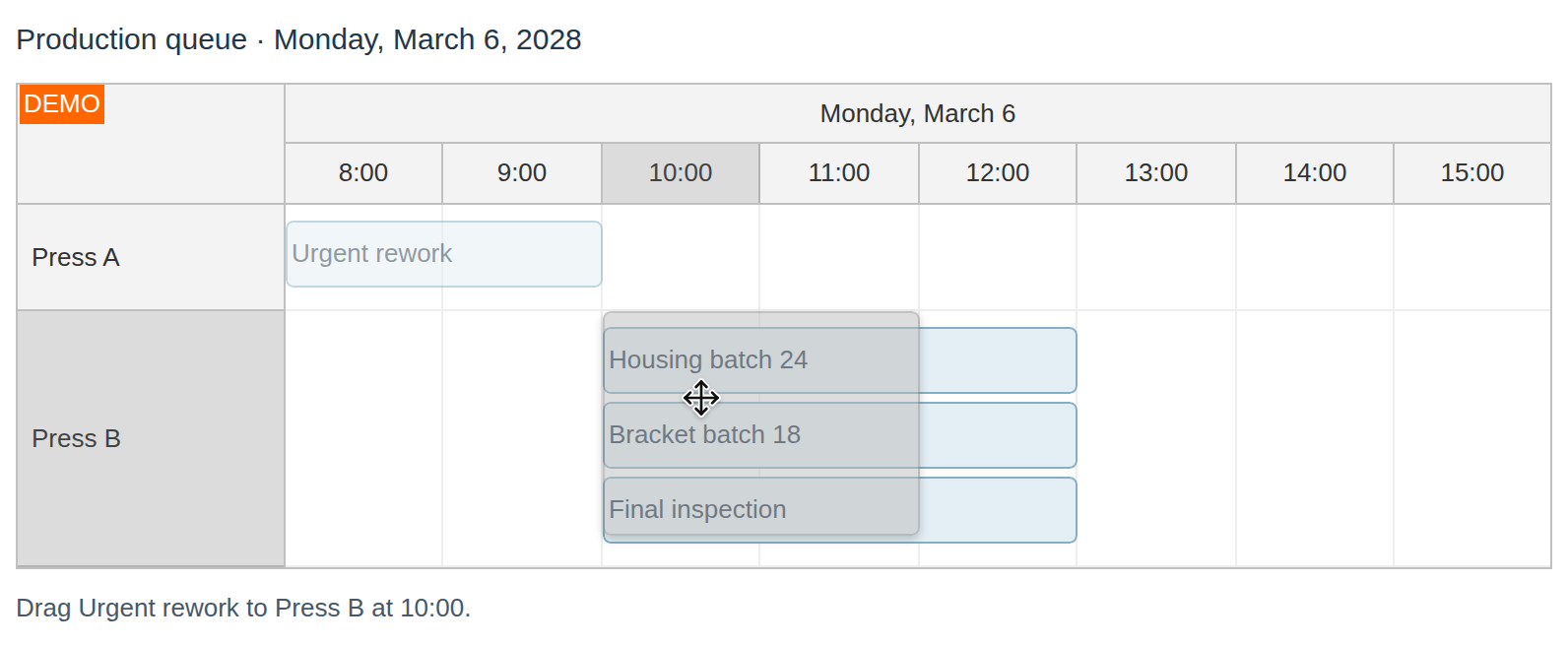
Default moving mode (moving to time cell)
Moving to a position inside a cell
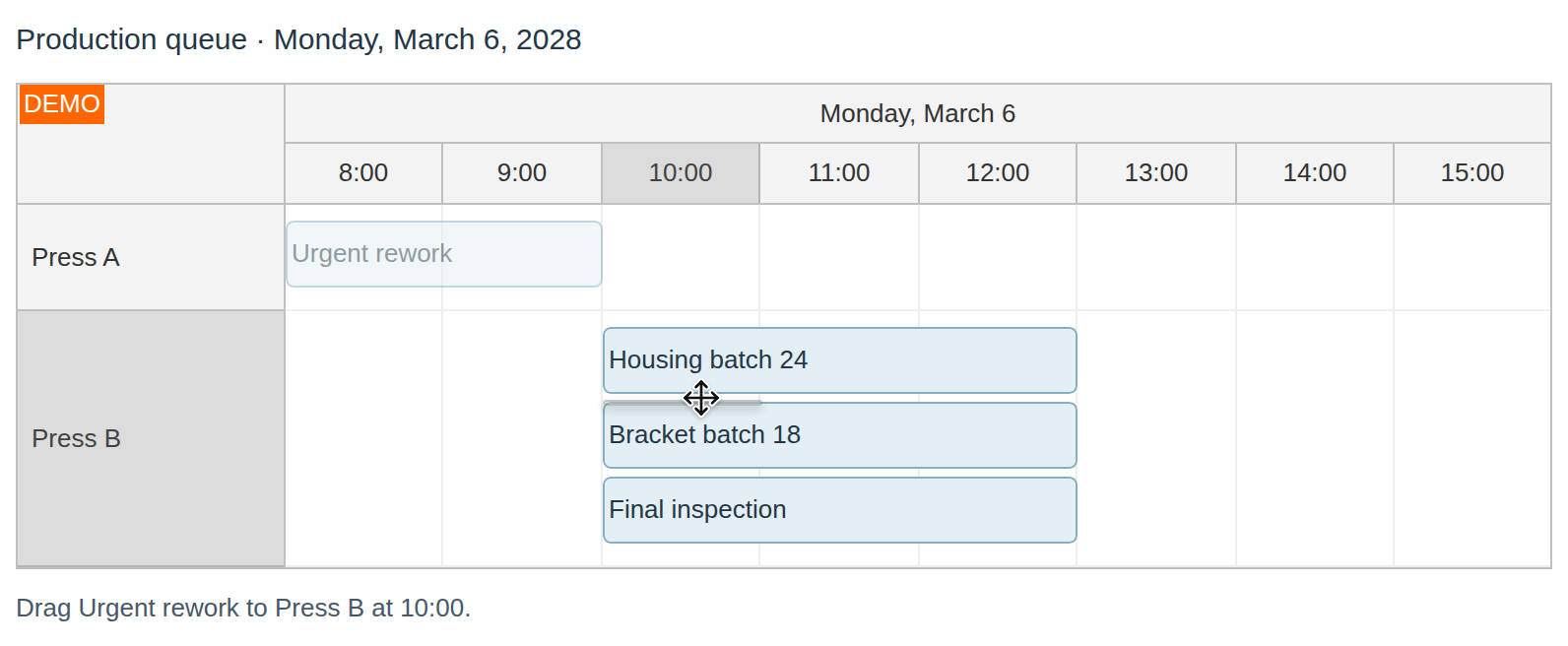
You can enable this mode by using EventMoveToPosition property. The selected position will be available in EventMove event handler as e.Position.
You should store the position in a separate database field and use it for event sorting.
API: eventMoveToPosition.
The framework examples enable eventMoveToPosition and place two overlapping events in Room A. Drag an event to choose its position among the stacking lines.
The framework examples use DayPilot Pro. For installation, see the Angular, React or Vue Scheduler guide.
Angular
import {Component} from "@angular/core";
import {DayPilot, DayPilotModule} from "daypilot-pro-angular";

@Component({
  selector: "app-scheduler-example",
  standalone: true,
  imports: [DayPilotModule],
  template: `

    <daypilot-scheduler [config]="config"></daypilot-scheduler>
  `
})
export class SchedulerExampleComponent {
  config: DayPilot.SchedulerConfig = {
    startDate: "2026-11-01",
    days: 30,
    scale: "Day",
    timeHeaders: [{groupBy: "Month"}, {groupBy: "Day", format: "d"}],
    resources: [{id: "A", name: "Room A"}, {id: "B", name: "Room B"}],
    events: [{id: 1, text: "First", resource: "A", start: "2026-11-03", end: "2026-11-06"}, {id: 2, text: "Second", resource: "A", start: "2026-11-03", end: "2026-11-06"}],
    eventMoveToPosition: true
  };

}
React
import React from "react";
import {DayPilot, DayPilotScheduler} from "daypilot-pro-react";

export default function SchedulerExample() {

  return <div>

    <DayPilotScheduler
      startDate={"2026-11-01"}
      days={30}
      scale={"Day"}
      timeHeaders={[{groupBy: "Month"}, {groupBy: "Day", format: "d"}]}
      resources={[{id: "A", name: "Room A"}, {id: "B", name: "Room B"}]}
      events={[{id: 1, text: "First", resource: "A", start: "2026-11-03", end: "2026-11-06"}, {id: 2, text: "Second", resource: "A", start: "2026-11-03", end: "2026-11-06"}]}
      eventMoveToPosition={true}
    />
  </div>;
}
Vue
<script setup>
import {DayPilot, DayPilotScheduler} from "daypilot-pro-vue";

const startDate = "2026-11-01";
const days = 30;
const scale = "Day";
const timeHeaders = [{groupBy: "Month"}, {groupBy: "Day", format: "d"}];
const resources = [{id: "A", name: "Room A"}, {id: "B", name: "Room B"}];
const events = [{id: 1, text: "First", resource: "A", start: "2026-11-03", end: "2026-11-06"}, {id: 2, text: "Second", resource: "A", start: "2026-11-03", end: "2026-11-06"}];
const eventMoveToPosition = true;

</script>

<template>
  <div>

    <DayPilotScheduler
      :startDate="startDate"
      :days="days"
      :scale="scale"
      :timeHeaders="timeHeaders"
      :resources="resources"
      :events="events"
      :eventMoveToPosition="eventMoveToPosition"
    />
  </div>
</template>
JavaScript
<div id="dp"></div>
<script type="text/javascript">
  var dp = new DayPilot.Scheduler("dp");
  dp.eventMoveToPosition = true;
  dp.onEventMoved = function(args) {
    dp.message("Event moved to position: " + args.position);
  }
  // ...
  dp.init();
</script>
ASP.NET WebForms
.aspx
<DayPilot:DayPilotScheduler runat="server" id="DayPilotScheduler1"
  ...
  EventMoveToPosition = "true"
/>
.aspx.cs
protected void DayPilotScheduler1_EventMove(object sender, DayPilot.Web.Ui.Events.EventMoveEventArgs e)
{
  // update the db here, reload events
  DayPilotScheduler1.UpdateWithMessage("Event moved to position: " + e.Position);
}
Demo
ASP.NET MVC
The target position is available in OnEventMove handler as e.Position (starting at index 0).
Example
View
@Html.DayPilotScheduler("dps_position", new DayPilotSchedulerConfig {
  BackendUrl = ResolveUrl("~/Scheduler/Backend"),
  ...
  EventMoveToPosition = true
})
Backend Controller
protected override void OnEventMove(EventMoveArgs e)
{
  // update the db here, reload events
  UpdateWithMessage("Moved to position: " + e.Position);
}
Demo
Availability
Availability of this feature in DayPilot editions:
| Product | Lite | Pro |
|---|---|---|
| DayPilot for JavaScript | ||
| DayPilot for ASP.NET WebForms | ||
| DayPilot for ASP.NET MVC | ||
| DayPilot for Java |