 DayPilot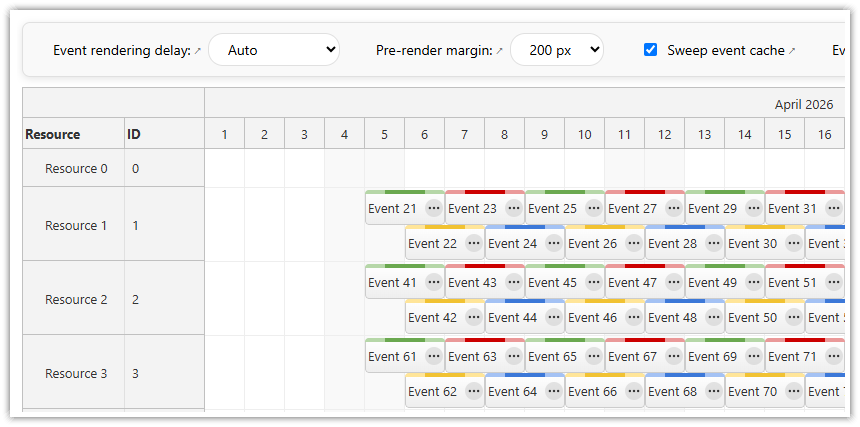
With progressive event rendering enabled, the Scheduler events are not rendered at once but progressively as a user scrolls. This mode assumes all events are already available on the client side (compare with dynamic event loading).
The dynamicEventRendering default is "Auto" in DayPilot Pro and "Progressive" in DayPilot Lite. Use "Progressive" to require viewport-based rendering, or "Disabled" to render the loaded events without that restriction.
In both the progressive and static modes the events are rendered in batches to provide visual feedback and prevent browser freezing.
Demo
See a live demo where you can test the behavior and different configuration options:
Synchronous and Asynchronous Rendering with Debouncing
The scrollDelayEvents property sets whether the event rendering will be synchronous (fast but requires a fast machine) or asynchronous with a debounce delay (good for smooth scrolling but introduces a visible delay). See also scrolling performance.
Viewport Size
The dynamicEventRenderingMargin property determines how many pixels will be loaded in addition to the current viewport in each direction. You can specify different margin for horizontal (X) and vertical (Y) axis:
Sweeping
By default, the events that move our of the viewport are removed (automatic sweeping is enabled). Only a specified buffer of events stay visible.
Keeping all rendered events visible gradually increases the DOM size and slow down the scrolling.
Dynamic Loading
The progressive event rendering improves performance but it's necessary to preload the events. That will only work well up to a certain threshold. On fast machines, the Scheduler can display 100,000s of events (see the Angular Scheduler demo that displays 400,000 events). However, these events need to be loaded from the server at once and the data set size can be quite big (400,000 events take about 46 MB uncompressed).
Consider dynamic event loading when downloading and retaining the full dataset is too expensive. Choose using realistic event sizes, resource counts, network conditions and target devices; there is no universal event-count cutoff.
See Also
JavaScript
<div id="dp"></div>
<script type="text/javascript">
  const dp = new DayPilot.Scheduler("dp", {
    dynamicEventRendering: "Disabled",
    // ...
  });
  dp.init();
</script>
API: dynamicEventRendering, heightSpec, height.
The framework examples generate 2,000 events across 100 resources, load them locally and force Progressive rendering in a 300-pixel-high viewport. Scrolling reveals the already loaded events; no server request is made by this setting.
The framework examples use DayPilot Pro. For installation, see the Angular, React or Vue Scheduler guide.
Angular
import {Component} from "@angular/core";
import {DayPilot, DayPilotModule} from "daypilot-pro-angular";

@Component({
  selector: "app-scheduler-example",
  standalone: true,
  imports: [DayPilotModule],
  template: `

    <daypilot-scheduler [config]="config"></daypilot-scheduler>
  `
})
export class SchedulerExampleComponent {
  config: DayPilot.SchedulerConfig = {
    startDate: "2026-11-01",
    days: 365,
    scale: "Day",
    timeHeaders: [{groupBy: "Month"}, {groupBy: "Day", format: "d"}],
    resources: Array.from({length: 100}, (_, i) => ({id: "R" + i, name: "Room " + i})),
    events: Array.from({length: 2000}, (_, i) => ({id: i, text: "Booking " + i, resource: "R" + (i % 100), start: new DayPilot.Date("2026-11-01").addDays(Math.floor(i / 100) * 3), end: new DayPilot.Date("2026-11-01").addDays(Math.floor(i / 100) * 3 + 2)})),
    dynamicEventRendering: "Progressive",
    heightSpec: "Fixed",
    height: 300
  };

}
React
import React from "react";
import {DayPilot, DayPilotScheduler} from "daypilot-pro-react";

export default function SchedulerExample() {

  return <div>

    <DayPilotScheduler
      startDate={"2026-11-01"}
      days={365}
      scale={"Day"}
      timeHeaders={[{groupBy: "Month"}, {groupBy: "Day", format: "d"}]}
      resources={Array.from({length: 100}, (_, i) => ({id: "R" + i, name: "Room " + i}))}
      events={Array.from({length: 2000}, (_, i) => ({id: i, text: "Booking " + i, resource: "R" + (i % 100), start: new DayPilot.Date("2026-11-01").addDays(Math.floor(i / 100) * 3), end: new DayPilot.Date("2026-11-01").addDays(Math.floor(i / 100) * 3 + 2)}))}
      dynamicEventRendering={"Progressive"}
      heightSpec={"Fixed"}
      height={300}
    />
  </div>;
}
Vue
<script setup>
import {DayPilot, DayPilotScheduler} from "daypilot-pro-vue";

const startDate = "2026-11-01";
const days = 365;
const scale = "Day";
const timeHeaders = [{groupBy: "Month"}, {groupBy: "Day", format: "d"}];
const resources = Array.from({length: 100}, (_, i) => ({id: "R" + i, name: "Room " + i}));
const events = Array.from({length: 2000}, (_, i) => ({id: i, text: "Booking " + i, resource: "R" + (i % 100), start: new DayPilot.Date("2026-11-01").addDays(Math.floor(i / 100) * 3), end: new DayPilot.Date("2026-11-01").addDays(Math.floor(i / 100) * 3 + 2)}));
const dynamicEventRendering = "Progressive";
const heightSpec = "Fixed";
const height = 300;

</script>

<template>
  <div>

    <DayPilotScheduler
      :startDate="startDate"
      :days="days"
      :scale="scale"
      :timeHeaders="timeHeaders"
      :resources="resources"
      :events="events"
      :dynamicEventRendering="dynamicEventRendering"
      :heightSpec="heightSpec"
      :height="height"
    />
  </div>
</template>
ASP.NET WebForms
<DayPilot:DayPilotScheduler runat="server" id="DayPilotScheduler1"
  ...
  DynamicEventRendering = "Disabled"
/>
ASP.NET MVC
@Html.DayPilotScheduler("dps", new DayPilotSchedulerConfig {
  BackendUrl = ResolveUrl("~/Scheduler/Backend"),
  ...
  DynamicEventRendering = DynamicEventRenderingType.Disabled
})
Availability
Availability of this feature in DayPilot editions:
| Product | Lite | Pro |
|---|---|---|
| DayPilot for JavaScript | ||
| DayPilot for ASP.NET WebForms | ||
| DayPilot for ASP.NET MVC | ||
| DayPilot for Java |