 DayPilot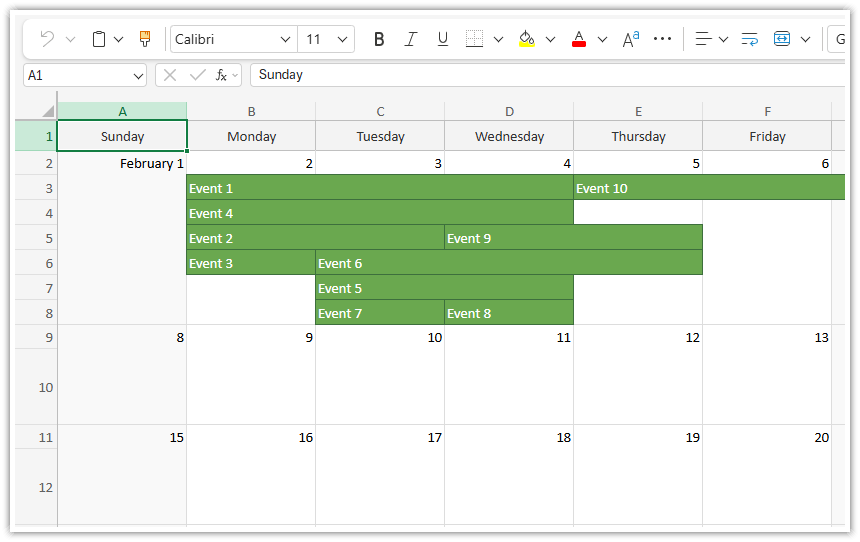
The JavaScript Monthly Calendar component supports client-side export to an Excel spreadsheet (xlsx format).
Available since 2026.1.6835.
Live Demo
Supported Features
Customization of background and font colors (days of week, cells, events)
Minimum cell height
Overlapping events
Events spanning multiple days
Dependencies
The Month component uses ExcelJS library (MIT license) to generate the Excel spreadsheet.
ExcelJS is not bundled: The reference to ExcelJS must be provided using the exceljs property.
Quick Example
Configuration:
Set the ExcelJS reference using the
exceljsproperty
Export:
Call the exportAs() method to get the export object:
exportAs("xlsx")The export object supports direct download using
download("file.xlsx")or async BLOB access usingtoBlobAsync().
<script src="https://cdnjs.cloudflare.com/ajax/libs/exceljs/4.4.0/exceljs.min.js"></script>

<div id="month"></div>

<button id="export">Export</button>

<script>

  const month = new DayPilot.Month("month", {
    exceljs: ExcelJS,
    onBeforeEventExport: args => {
      args.data.backColor = "#6aa84f";
      args.data.fontColor = "#ffffff";
      args.data.borderColor = "#3d6f3d";
    },
    // ...
  });
  calendar.init();

  const app = {
      init() {
          this.bindEvents();
      },
      bindEvents() {
          document.getElementById('export').addEventListener('click', (ev) => {
              const options = {
                  mime: "application/octet-stream",
                  area: "full",
              };
              calendar.exportAs("xlsx", options).download("month.xlsx");
          });
      }
  };
  app.init();

</script>
Exported Area
At this moment, the Month component only supports full grid export.
Overlapping Events
Overlapping events are supported. The cell height is extended automatically.
Word Wrap
Not implemented.
Adjusting Dimensions
Excel uses its own units for column widths and row heights.
The Month component translates the pixel measures to the Excel units. The output should roughly correspond to the dimensions displayed in the browser.
You can also provide custom unit conversion calculations:
to better adjust the dimensions to the target environment
to scale up/down
Custom width conversion function:
calendar.exportAs("xlsx", {
  transformWidth: width => (width - 5) / 7
}).download();
Custom height conversion function:
calendar.exportAs("xlsx", {
  transformWidth: height => height * 0.75
}).download();
Event Appearance
The following properties can be configued using onBeforeEventRender or onBeforeEventExport:
backColorborderColorfontColor
The colors must be in hex format (e.g., "#ffffff").
Output
You can export the XLSX file as a Blob using the getBlobAsync() method:
const blob = await month.exportAs("xlsx").getBlobAsync();You can also directly invoke the download using the download() method:
month.exportAs("xlsx").download("month.xlsx");The default MIME type of the output is application/vnd.openxmlformats-officedocument.spreadsheetml.sheet. If needed (e.g., in Salesforce LWC), you can set custom MIME type using the mime property:
month.exportAs("xlsx", {
  mime: "application/octet-stream"
}).download();
Limitations
Spreadsheets have only a single layer and all elements needs to match the grid. That limits the Month component representation in the output xlsx file.
Features that rely on multiple layers and more complex layout are not supported, including:
Active areas
Duration bar
Custom HTML
CSS (rounded corners, transparency, transformations…)
Availability
Availability of this feature in DayPilot editions:
| Lite | Pro | |
|---|---|---|
| DayPilot for JavaScript | ||
| DayPilot for ASP.NET WebForms | ||
| DayPilot for ASP.NET MVC | ||
| DayPilot for Java |